Lambda Functions#
reading
A nice lambda cheatsheet is available from hackingcpp.com.
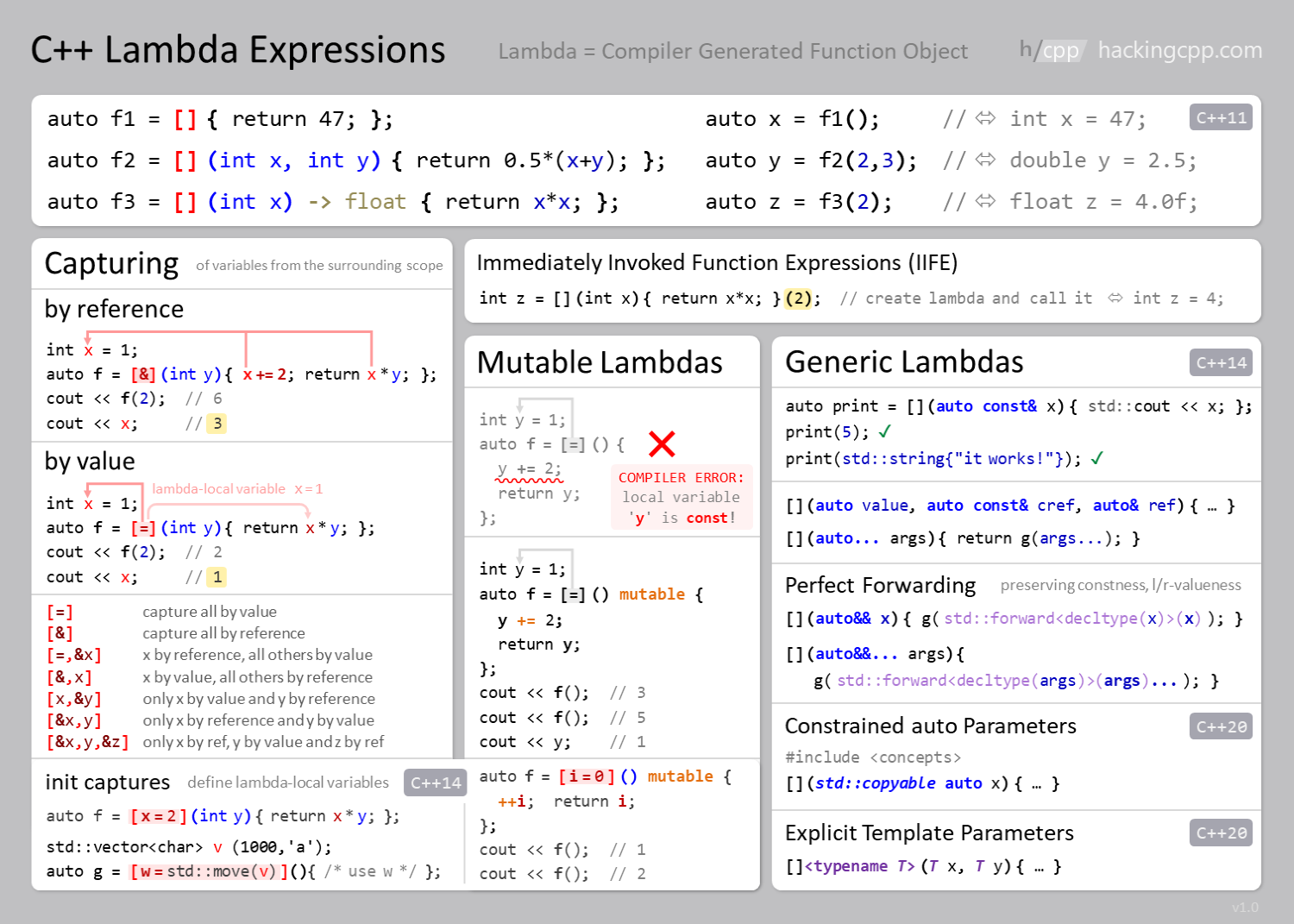
C++ has another type of function called a lambda function. You can think of a lambda as an anonymous function that can capture data directly from its environment and work on it. Lambda functions are typically used when you only need to use a function in a single place.
The general form of a lambda is:
[capture clause] (arguments) {statements};
with optionally some specifiers between the arguments and statements.
The capture clause tells the compiler how it can access data from the surrounding scope:
[=]means it captures objects by value[&]means it captures objects by reference
mixed types of capture are also possible, where you can capture some data by value and others by reference
Note
There can be multiple statements in the { } part of the lambda
function. Each should be terminated with a ;, just like any
other C++ we write.
Here’s a simple example:
#include <iostream>

int main() {

    double x{10.0};

    auto f = [=] (double y) {return x + y;};

    std::cout << f(1) << " " << f(2) << " " << f(3) << std::endl;

    auto g = [&] () {x *= 2; return x;};

    std::cout << g() << " " << g() << " " << g() << std::endl;

    std::cout << "x = " << x << std::endl;

}
Here, the function f computes x + y, but only y is an
argument of the function. The value (we used [=]) of x is
captured from the surrounding scope and used in the function.
In the second example, function g, we captured x by reference
[&], so we can update it.
Sort Example#
Lambdas make it easy to provide simple functions as arguments
to other functions (like we did with std::ranges::sort() previously).
Here’s an implementation of that using a lambda function:
#include <iostream>
#include <vector>
#include <string>
#include <algorithm>

int main() {

    std::vector<std::string> titles{"a new hope",
                                    "the empire strikes back",
                                    "return of the jedi",
                                    "the phantom menace",
                                    "attack of the clones",
                                    "revenge of the sith",
                                    "the force awakens",
                                    "the last jedi",
                                    "the rise of skywalker"};

    std::ranges::sort(titles);

    for (const auto& e : titles) {
        std::cout << e << std::endl;
    }
    std::cout << std::endl;

    // now sort by string length

    std::ranges::sort(titles,
                      [] (const std::string& a, const std::string& b)
                          {return a.size() < b.size();});

    for (const auto& e : titles) {
        std::cout << e << std::endl;
    }
    std::cout << std::endl;

}
Here, our lambda function is:
[] (const std::string& a, const std::string& b)
   {return a.size() < b.size();}
This means:
We don’t capture any data from the surrounding scope,
[]Our function takes 2 strings as const references,
(const std::string& a, const std::string& b)We return a
boolby comparing the sizes,{return a.size() < b.size();}Note that C++ deduces the return type from the function definition, so we don’t write
boolexplicitly here.
try it…
We can change the sort to alphabetically by the last letter in the title by doing:
[] (const std::string& a, const std::string& b) {return a.back() < b.back();}