Homework #5#
Completing this assignment
For the each of the problems below, write a separate C++ program
named in the problem problemN.cpp, where N is the
problem number.
Important
Make sure your that g++ can compile your code. For some of
the problems here, you will need to use -std=c++20.
Upload your C++ source files (not the executables produced by g++) to Brightspace.
Important
All work must be your own.
You may not use generative AI / large-language models for any part of this assignment.
Computing \(\epsilon\) :
When we discussed Floating Point, we learned about \(\epsilon\), the smallest number that can be added to one that gives a result distinct from \(1\).
Note
I originally wrote “that can be added to one that gives a result indistinguishable from \(1\)”. This will differ by a factor of 2 from the statement above.
For this assignment, I am not worrying about a factor of 2. We really want to understand the order-of-magnitude.
Let’s estimate that now. We will write a program that starts with a large guess for \(\epsilon\) and then, using a loop, continually cuts it until roundoff makes \(1 + \epsilon\) indistinguishable from \(1\):
Structure your program as follows:
initialize \(\epsilon = 1\)
loop, using a while construct, testing if \(1 + \epsilon \ne 1\):
cut \(\epsilon\) in half
output \(\epsilon\)
You loop should continue until the test fails. At that point, \(\epsilon\) should be close to the actual value.
This gives:
epsilon ~ 1.11022e-16
Projectile motion : We’ll write a simple code that does projectile motion.
If we assume that our projectile starts at a position \((x, y) = (0, 0)\), and is launched with a velocity \(v\) at an angle \(\theta\) from the horizontal, then the equations of motion are:
\[x = x_0 + v \cos\theta \, t\]\[y = y_0 + v \sin\theta \, t + \frac{1}{2} g t^2\]Use SI units, where \(g = -9.81~\mathrm{m~s^{-2}}\).
Structure your code as follows:
Create a
structcalledProjectilewith 3 data members:t,x,yAsk the user for an angle (positive, from the horizontal), initial velocity magnitude (m/s), and a time interval \(\Delta t\) (s) at which we want to store the projectile’s position.
Note
\(\Delta t\) should be chosen to be much smaller (~ few %) than the flight time of the projectile.
Create a
std::vectorofProjectileStart at \(t = 0\) and \((x, y) = 0\), and loop for as long as the projectile is in the air (\(y >= 0\)).
Tip
Use a
whileloop here.Compute the current \(x\) and \(y\) position of the projectile
Store the position in your vector.
Increment the time by \(\Delta t\)
Finally, output the trajectory as rows with 3 columns: \(t\), \(x\), and \(y\). Use
std::formatto make the data line up neatly in columns.
Later we’ll see how to plot this output.
solution
#include <iostream>
#include <vector>
#include <numbers>
#include <cmath>
#include <format>

struct Projectile {
    double t{};
    double x{};
    double y{};
};

int main() {

    std::vector<Projectile> trajectory{};

    double angle{};
    double vmag{};
    double dt{};

    std::cout << "# Enter angle (degrees), velocity (m/s), and time interval (s): ";
    std::cin >> angle >> vmag >> dt;
    std::cout << std::endl;

    // convert angle to radians
    angle *= std::numbers::pi / 180.0;

    // initial conditions
    double t{};
    double x0{};
    double y0{};

    const double g = -9.81;

    trajectory.push_back(Projectile{.t=t, .x=x0, .y=y0});

    while (trajectory[trajectory.size()-1].y >= 0.0) {
        t += dt;
        double xnew = x0 + vmag * std::cos(angle) * t;
        double ynew = y0 + vmag * std::sin(angle) * t + 0.5 * g * std::pow(t, 2.0);

        trajectory.push_back(Projectile{.t=t, .x=xnew, .y=ynew});
    }

    for (const auto& e : trajectory) {
        std::cout << std::format("{:7.4f} {:8.5f} {:8.5f}\n",
                                 e.t, e.x, e.y);
    }

}
Some comments on the code:
We read in all 3 inputs with a single line:
std::cin >> angle >> vmag >> dt;
alternately, we could do:
std::cin >> angle;
std::cin >> vmag;
std::cin >> dt;
We access the last element of our vector in our
whileloop:while (trajectory[trajectory.size()-1].y >= 0.0)
Each iteration through the loop, this will be reevaluated and
trajectory[trajectory.size()-1]will always be the lastProjectileobject added to our vector.
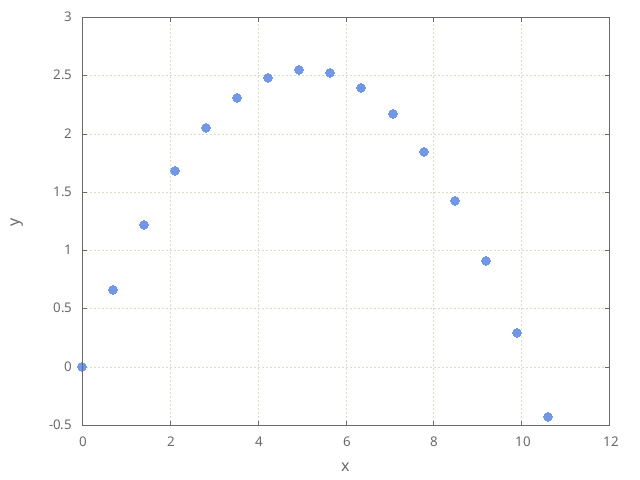
We can plot this by doing using gnuplot.
Tip
When outputting the header, I started with a
#—gnuplot will ignore this line (it treats anything starting with#as a comment.If we want to redirect the output to a file, we need to have a way to send in the input that
cinwill read. We can do this as:echo 45 10 0.1 | ./projectile > outThis will set the angle to 45 degrees, the velocity to 10 m/s, and the timestep to 0.1 s.
Here’s a gnuplot script that will plot the output:
set term png enhanced
set output "projectile.png"

set xlabel "x"
set ylabel "y"

set grid

plot "out" using 2:3 notitle
and the resulting plot: