Pointers#
reading
pointers from Wikipedia
Pointers are similar to references in that they provide indirect access to an object’s data. However, in C++, references are much more widely used than pointers.
References and pointers can provide similar functionality. Pointers are more general but also more error-prone. Some differences, following differences between references and pointers:
A pointer is an object. It has its own memory where the address of what it is pointing to is stored. A reference is just an alias—another name for something.
We can change what a pointer is pointing to. A reference is set when it is initialized and cannot be made to refer to some other object.
A pointer can point to nothing (
nullptr). A reference always refers to something (and that is set when it is initialized).
We define a pointer by using the * operator in the declaration, e.g.,
int *x;
We read this as *x is a pointer to an int.
Here’s a simple example:
int *a = nullptr;
int b{};

a = &b;
This has the pointer a point to the memory location of b (we
use the address operator & here). Visually, this appears as:
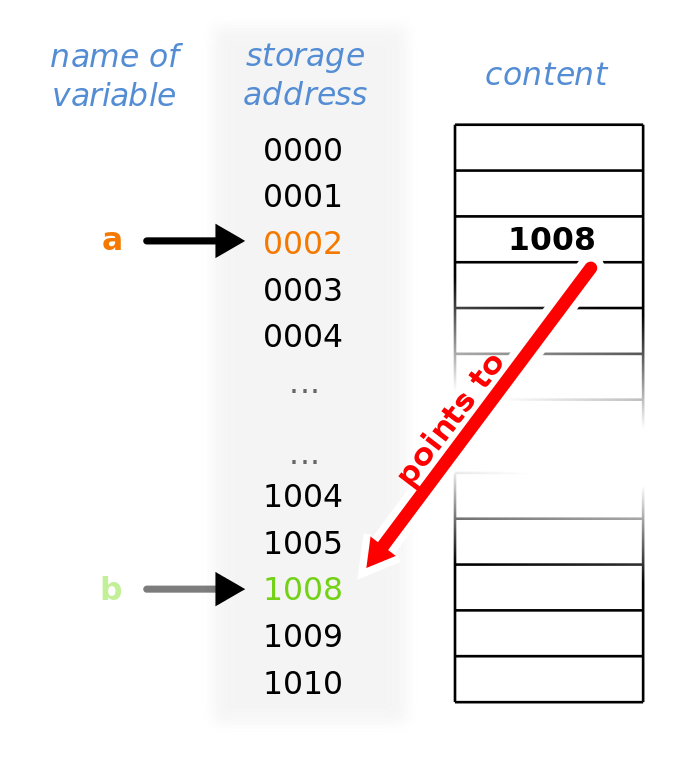
Fig. 10 A pointer, a that points to the memory location of variable b.#
(Wikipedia/Sven)
We can access the data pointed to by the pointer by using the
dereference operator, *.
Here’s a more complete version of our example above, showing both the value of the pointer (the memory address it points to) and the value of the data there (dereferencing the pointer):
#include <iostream>

int main() {

    int *a = nullptr;

    int b{};

    a = &b;

    std::cout << "pointer value (memory location) = "
              << a << std::endl;
    std::cout << "value of what we are pointing to (dereferencing pointer) = "
              << *a << std::endl;

}
Note: the memory address you see on your computer will be different
that what someone else sees, and also change if you rerun the program
some time later. The operating system determines where b is stored
in memory when the program is run.
Full example#
Here’s an example showing how to access data via a reference or a pointer.
#include <iostream>

int main() {

    double x{2.0};

    double *x_ptr = nullptr;

    double &x_ref = x;

    std::cout << "x = " << x << std::endl;

    // we can access x through the reference x_ref

    x_ref *= 2.0;

    std::cout << "x = " << x << std::endl;
    std::cout << "x_ref = " << x_ref << std::endl;

    // now let's associate x_ptr with x

    x_ptr = &x;

    // to access the data pointed to by x_ptr, we need to
    // dereference it

    std::cout << "x_ptr = " << x_ptr << std::endl;
    std::cout << "*x_ptr = " << *x_ptr << std::endl;

    // likewise, to modify its value

    *x_ptr *= 2;

    std::cout << "x = " << x << std::endl;
    std::cout << "x_ref = " << x_ref << std::endl;

}
Note
We will not use pointers directly much in this class, but they are useful for managing memory. We will not go into that topic in this class.
Tip
It is a good idea to initialize all pointers (just like we do for
all other object types). C++ provides nullptr for this reason:
int *p = nullptr;
This then allows us to use the pointer in a conditional, like:
if (p) {
    // do stuff
}